Social media
X, LinkedIn, Facebook, Instagram, YouTube, Xiaohongshu, Douyin, Bilibili, Zhihu: sign in, collect stats, see performance, self-test.
The Social media page is for accounts and numbers. Posts are edited, reviewed and published in Content center under "Channel versions" (see "Content center"); scheduled posts show in the Publishing calendar.
Add an account in Sites & accounts → "Add site or account". A browser window opens for you to sign in. The login stays on this computer; a new computer needs a new sign-in.
| Platform | What it posts | Minimum gap | Max per day |
|---|---|---|---|
| X | Posts, up to 4 images | None | 10 (in 24 hours) |
| Posts on a personal profile, images or video | 60 min | 5 | |
| Posts on your profile or a Page you manage, images or video | 30 min | 10 | |
| Posts, images required | 60 min | 5 | |
| YouTube | Videos | 60 min | 3 |
| Xiaohongshu | Notes, images or video; without images, a text cover is made from the cover text | 2 hours | 3 |
| Douyin | Videos, reviewed by Douyin after posting | 30 min | 10 |
| Bilibili | Videos, reviewed by Bilibili after posting | 30 min | 10 |
| Zhihu | Column articles with images in the text, up to 3 topics | 30 min | 5 |
The spacing and daily counts are only suggestions; posts still go out if you exceed them, but posting too often can get throttled. Social features come from the social plugin: if a notice at the top says it isn't installed, install social in Annulo's Settings → Projects → Plugins.
Social media in the sidebar, first tab "Accounts":
- Three numbers at the top: Accounts, New followers (30 days), Accounts needing attention (login expired or publishing problems);
- Accounts & publishing status: each account's followers (the arrow is the 30-day change), connection status, last post, and what to do next: "View data", "Fix publishing", "Sign in again";
- Recent posts: the last 5 published posts with views, likes and comments; "View post" opens it on the platform.
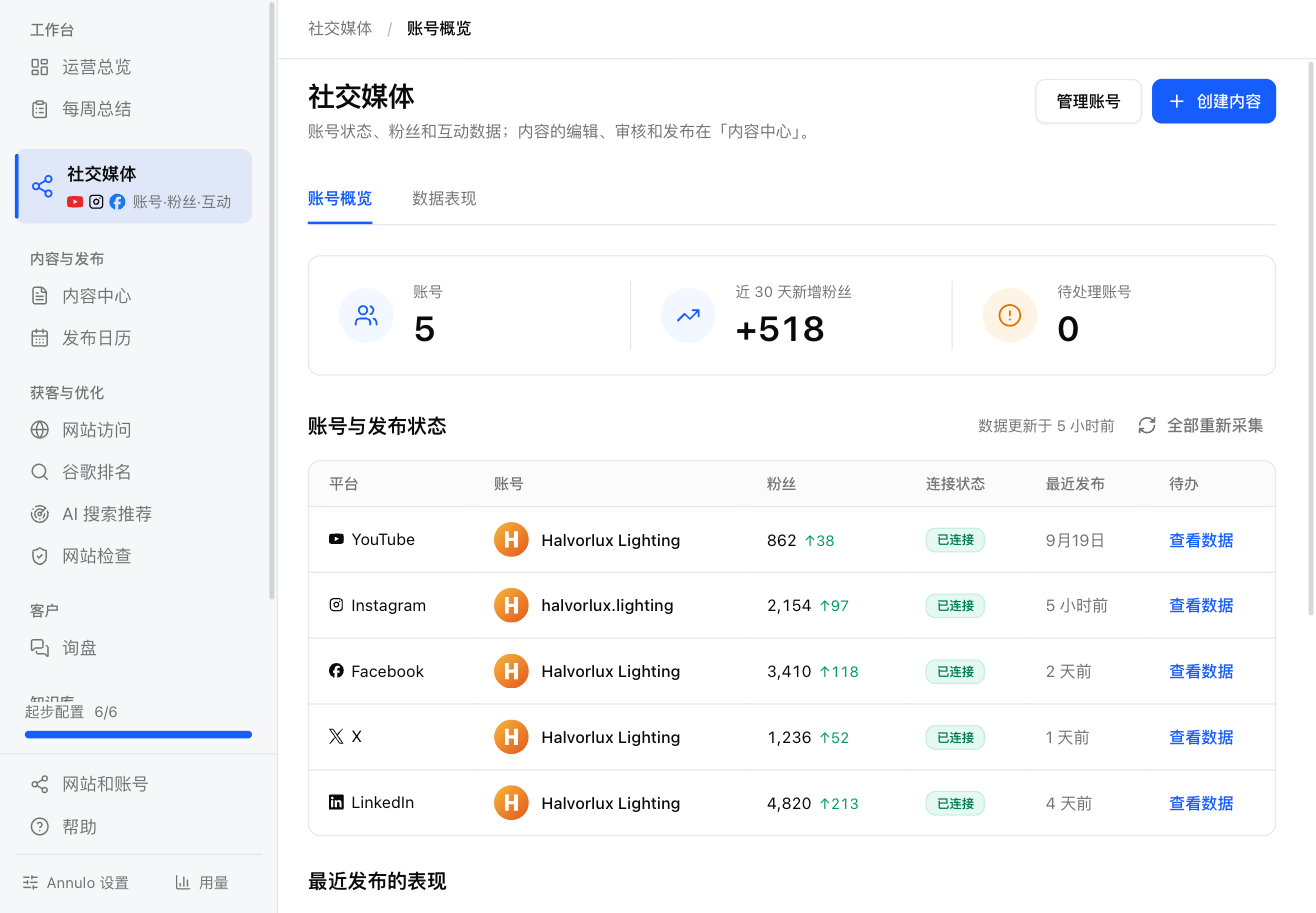
"Manage accounts" at the top right goes to Sites & accounts; "Create content" starts a new article in Content center.
The second tab, "Performance". Pick an account and a period (last 7 / 30 / 90 days) at the top:
- The account card: sign-in status, followers, last collection, "Profile" and "Collect now";
- Posts published in the period, new followers and engagement, and a daily chart (needs at least two days of collection);
- The posts list: each post's numbers; click a column header to sort by it. Show only the period's posts or all of them. Click a title to open its version in Content center.
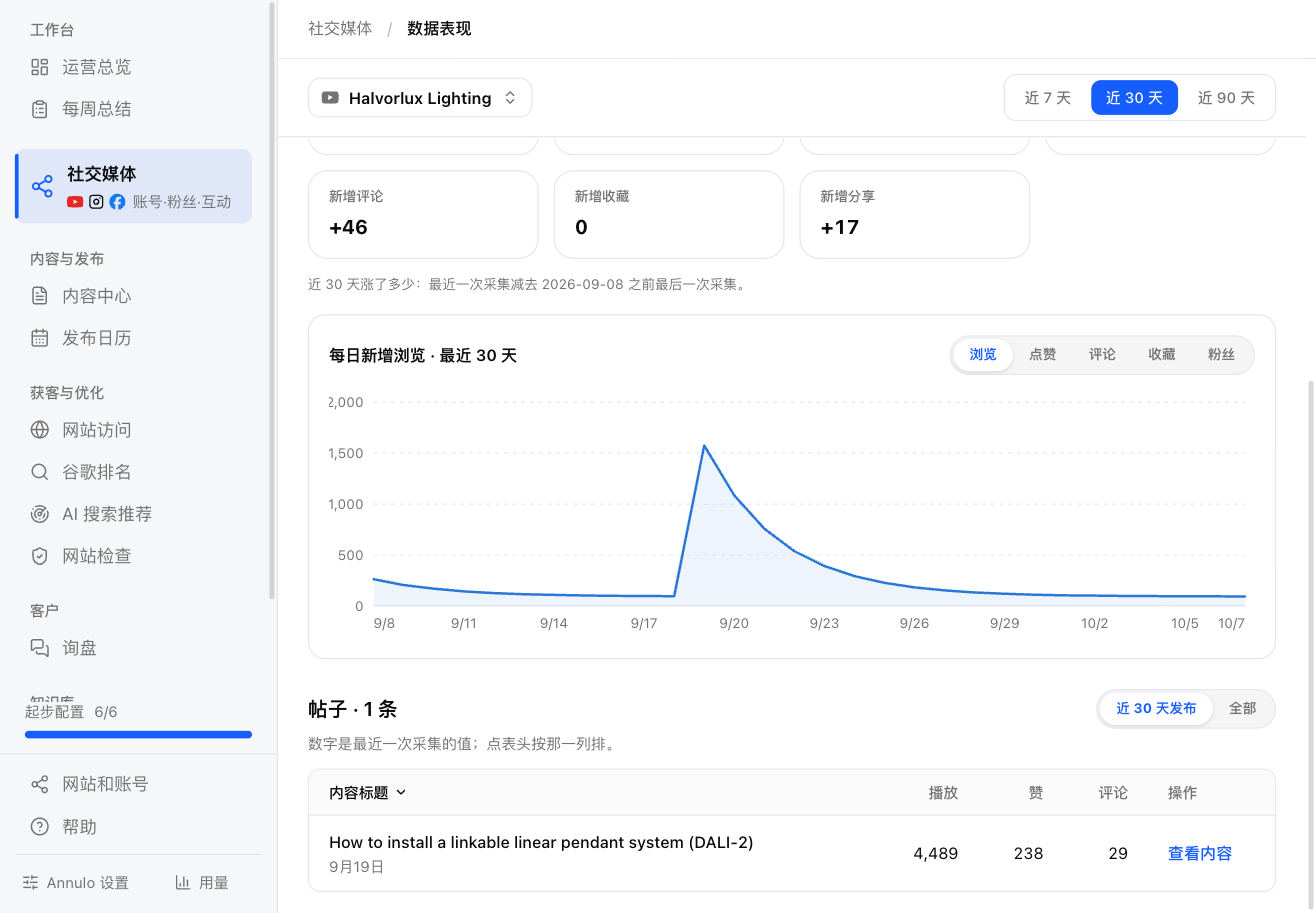
Followers and per-post stats are collected every 6 hours (Annulo must be open). Posts you made directly on the platform are picked up too. For fresh numbers: "Collect now" on an account card, or "Collect all again" under Accounts (one account at a time). Collecting opens a browser for a while; doing it too often can get you rate-limited.
When a platform changes its site, posting or collecting can break. A self-test runs every day at 08:30: it signs in, reads data, opens the post composer and finds the publish button, without posting.
- The account card shows the last result; "Self-test" runs one now;
- When something breaks, Today's work on the Operations overview shows "Social publishing needs repair". "Ask assistant to fix" has the assistant update that platform's code following the plugin's notes;
- Stuck on "Publishing" but nothing is running (say Annulo was closed mid-publish)? Click "Mark as failed" and publish again. A retry first looks for the post on the platform, so one that already went out isn't posted twice.
An account signed in on another computer shows "Logged in on another computer"; that computer does its posting and collecting. To move it here, click "Log in on this computer".